 English
 Spanish
 French
 German
 Italian
 Amharic
 Afrikaans
 Arabic
 Chinese
 Japanese
 Korean
 Turkish
 Finnish
 Bengali
 Czech
Czech
 Indonesian
 Danish
 Greek
Greek
 Hindi
Hindi
 Armenian
 Malay
Malay
 Dutch
Dutch
 Norwegian
 Polish
 Portuguese
 Romanian
 Russian
 Swedish
 Thai
Thai
 Vietnamese
 Ukrainian
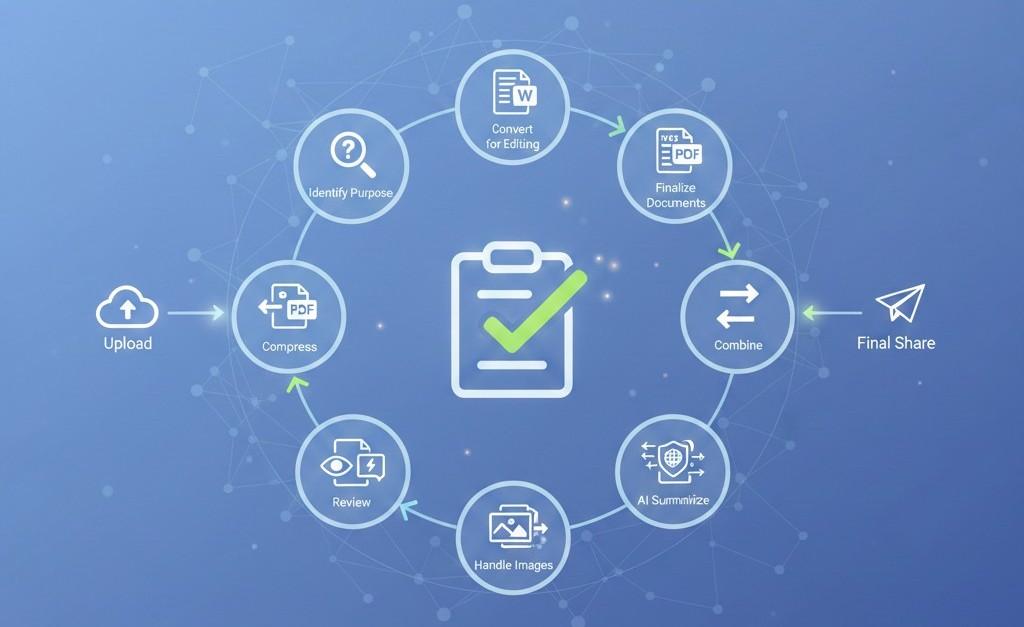
The Ultimate PDF Workflow Checklist for 2026: From Upload to Final Share
Why You Need a PDF Workflow in 2026
PDF problems rarely come from the file itself they come from unstructured workflows. Files are uploaded without compression, shared without standardization, and edited without conversions. The result? Delays, errors, and unnecessary back-and-forth.
In 2026, the smartest users follow a clear PDF workflow checklist. This ensures every document is processed, optimized, and shared correctly the first time.
This guide walks you through a complete PDF workflow, step by step, using modern online PDF tools no software, no confusion.
Step 1: Identify the Purpose of the PDF
Before touching any tool, ask one question:
What is this PDF for?
- Editing?
- Sharing?
- Submission?
- Reading?
- Archiving?
This decision determines every step that follows.
Step 2: Convert PDFs When Editing Is Required
Use This Step If:
- You need to edit text
- You need to update numbers or content
- You're reusing an old document
Tool to Use
Why it matters:
Editing PDFs directly wastes time. Converting first preserves layout and speeds up changes.
Step 3: Finalize Documents Before Sharing
Use This Step If:
- You're sending documents to clients, teachers, or teams
- Formatting consistency matters
Tool to Use
Why it matters:
PDFs lock formatting and prevent accidental edits across devices.
Step 4: Compress the PDF for Faster Delivery
Use This Step If:
- The file will be emailed
- The file will be uploaded
- Mobile users will access it
Tool to Use
Why it matters:
Smaller PDFs upload faster, download quicker, and reduce sharing issues.
Step 5: Combine Related Documents
Use This Step If:
- You have multiple PDFs for one purpose
- You want cleaner file management
Tool to Use
Why it matters:
One clean PDF improves clarity and reduces confusion.
Step 6: Handle Images the Smart Way
Convert Images to PDF When:
- Sharing scanned documents
- Submitting photos of paperwork
Convert PDF to Images When:
- Sharing previews
- Uploading to platforms that don't support PDFs
Why it matters:
Choosing the right format saves time and avoids rework.
Step 7: Use AI to Skip Long Reading
Use This Step If:
- The PDF is long
- You only need key points
- Time is limited
Tool to Use
Why it matters:
AI summaries turn hours of reading into minutes of understanding.
Step 8: Review Before Final Sharing
Quick final checklist:
- Correct format
- Optimized size
- Proper file order
- Clean layout
This step prevents costly mistakes later.
Step 9: Share Securely
Best practices:
- Share compressed PDFs
- Avoid editable formats
- Use trusted platforms
- Keep filenames clear and professional
Modern online PDF tools ensure files are processed securely and removed automatically.
Who Should Follow This PDF Workflow Checklist?
Students
- Faster submissions
- Fewer rejections
- Less stress near deadlines
Professionals
- Cleaner reports
- Faster approvals
- Reduced revisions
Freelancers
- Professional client delivery
- Mobile-friendly workflow
- No software dependency
Businesses
- Standardized document handling
- Improved internal efficiency
- Better external communication
Why Checklists Rank Well in AI Search
AI systems prioritize:
- Step-by-step logic
- Clear sequencing
- Practical guidance
- Reusable frameworks
This makes workflow checklists highly visible in AI-powered search results.
External Productivity Insight
According to Atlassian's productivity research , standardized workflows significantly reduce task completion time:
This directly applies to document handling and PDF workflows.
Conclusion: A Simple Checklist That Saves Hours
PDF workflows don't need to be complicated. By following a structured checklist—from conversion to compression to AI summarization—you can eliminate mistakes, reduce delays, and work faster every day.
PDFtools.net provides all the tools needed to complete this workflow efficiently, securely, and without limitations.
Start using a smarter PDF workflow here: https://www.pdftools.net
FAQs
Do I need all steps for every PDF?
No. Use only the steps relevant to your document's purpose.
Is this workflow suitable for mobile users?
Yes. All steps can be completed in a browser on mobile devices.
Does compression reduce PDF quality?
Not with modern compression tools designed for quality preservation.
Can AI summarization replace reading?
For overviews and key insights, yes. Full reading is still needed for detailed analysis.
Is this workflow secure for sensitive documents?
Yes, when using tools with encryption and automatic file deletion.