 English
 Spanish
 French
 German
 Italian
 Amharic
 Afrikaans
 Arabic
 Chinese
 Japanese
 Korean
 Turkish
 Finnish
 Bengali
 Czech
Czech
 Indonesian
 Danish
 Greek
Greek
 Hindi
Hindi
 Armenian
 Malay
Malay
 Dutch
Dutch
 Norwegian
 Polish
 Portuguese
 Romanian
 Russian
 Swedish
 Thai
Thai
 Vietnamese
 Ukrainian
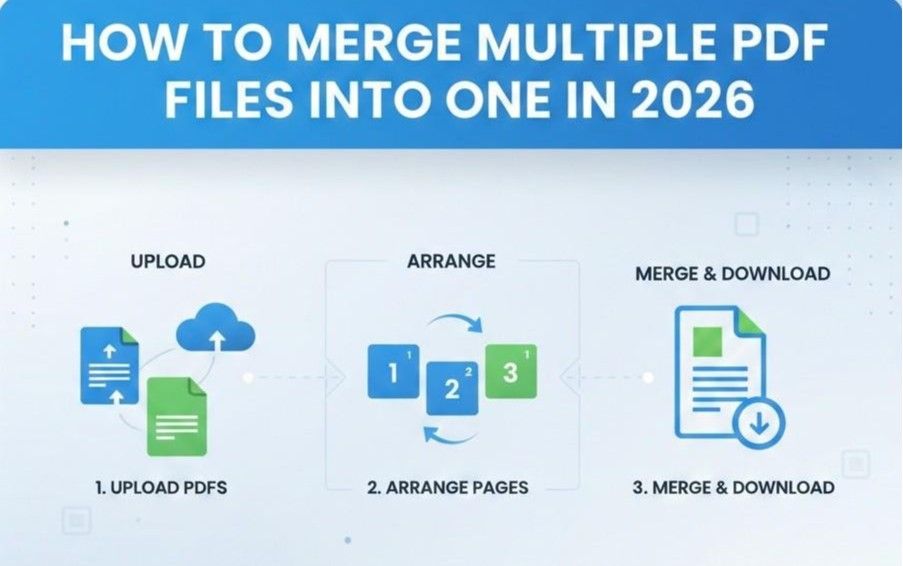
How to Merge Multiple PDF Files into One in 2026
PDF files appear everywhere, and users face challenges when many documents exist separately in daily work tasks. One merged file offers clarity and control and reduces confusion during document use for busy professionals today.
People merge PDFs to manage reports, invoices, and records within a single accessible document across many industries worldwide. This approach saves time, improves focus, and supports smoother communication across teams during important business processes.
Merged PDFs help users share files easily and keep related pages in order without page loss issues. Many professionals need merged documents for storage accuracy, compliance, and consistent presentation in modern workplaces.
Merging PDFs requires tools that not only offer a flawless PDF merger but also ensure data security. The following is a detailed guide on how to merge PDF files into one using secure online tools.
How PDF Merging Works
PDF merging begins when the software reads each source file structure and page tree. The program loads metadata, fonts, images, and content streams from every selected document. Each page receives an internal identifier that maintains original order across merged output. Security settings allow reading rights before the software continues the merge process.
The engine copies page objects into a new container document sequentially. It recalculates cross-reference tables so links point to the correct objects. Font resources receive deduplication to reduce size without harming visual consistency. Image streams keep resolution settings to preserve clarity across combined pages. Color profiles remain consistent to ensure accurate appearance across different devices.
Bookmarks, outlines, and annotations move into the final file with updated references. The PDF merger writes a new catalog dictionary that defines document-level properties. Validation checks scan errors, encryption conflicts, and damaged pages prior to output storage. The system exports the merged PDF with a consistent structure and reliable quality.
Step-by-Step: Merge PDF Files
Here is how to merge PDF files free by using online platforms.
1. Upload multiple PDFs
Users upload multiple PDF files through a secure interface using their device. The system checks file integrity and confirms compatibility before allowing further actions.
2. Arrange pages
Users arrange pages by dragging thumbnails into the preferred sequence visually. The tool displays page numbers clearly and updates order instantly after each change.
3. Merge and download
Users start the merge process with a clear command button press. The platform generates one combined PDF and provides a fast download link. Saved files retain original quality and open smoothly across common PDF readers.
Best PDF Merge Tools
The following are some of the most famous and trusted PDF mergers online.
1. Smallpdf
Smallpdf offers an online PDF merge tool that is easy to use in any web browser. It allows users to upload their PDF files and rearrange pages before merging. The tool keeps original text formatting and images intact once combined. Smallpdf works on Windows, Mac, Linux, and on mobile browsers without complicated setup.
Pros
- A very simple interface helps beginners merge files quickly
- Works in most browsers without software installation required
- Encrypts and removes files from the website after processing
Cons
- Restricted merges per day in the free tier
- Bigger files upload slowly on a weak internet
- Advanced options require a paid plan subscription
2. Adobe Acrobat
Adobe Acrobat offers an official online and desktop merge PDF tool trusted by professionals. Users can combine up to many files into one document in a few clicks. The tool lets users reorder pages and adjust content before saving. Acrobat also integrates with full PDF editing functions when needed.
Pros
- Works online and offline on a desktop with full Acrobat features
- Preserves fonts, graphics, and layout with high fidelity
- Lets users reorder, add, or delete pages before merging
Cons
- Most merge features require a paid subscription
- New users may find the interface complex to learn
- Must sign in before downloading some merged files
3. iLovePDF
iLovePDF provides a free web-based merge PDF tool with drag and drop page ordering. It supports uploading from a local device and cloud services like Google Drive. The site also has many other free PDF editing and conversion tools.
Pros
- Free access with easy page reordering before merging
- Works in most browsers on phones, tablets, or computers
- Offers many companion tools, like splitting and compressing PDFs
Cons
- Very large merges may require a premium account
- The Internet must remain connected during the merging process
- Some features require signing in before use
Let's have a brief comparison of the tools mentioned above.
| Feature | Smallpdf | Adobe Acrobat | iLovePDF |
|---|---|---|---|
| Free Use | Yes with limits | Only basic free online | Yes major functions free |
| Offline Option | Limited | Full desktop available | Desktop app exists |
| Page Reordering | Yes | Yes | Yes |
| Cloud Storage Support | Yes | Yes | Yes |
| Best For | Casual online merging | Professional editing workflows | Users wanting free full suite |
Common Merge Problems
PDF merging is not always smooth; you may face a few problems. Here are some of them.
1. Wrong Page Order
Users often face the wrong page order when multiple PDF documents are combined. This problem confuses readers and disrupts logical flow across important document sections. Preview thumbnails and manual rearrangement help users confirm the correct sequence before final export.
2. File Size Increase
File size often increases because combined PDFs include duplicate images and fonts. Large files slow downloads and create storage issues on devices and cloud accounts. Compression tools and font optimization reduce size and maintain acceptable visual quality.
3. Formatting Inconsistency
Merged PDFs sometimes show inconsistent formatting across pages from different source files. Font substitutions and spacing changes reduce readability and professional appearance overall. Page size standards and embedded fonts help maintain a uniform layout across documents.
4. Security Restrictions
Security restrictions block file combination when PDFs contain passwords or editing limitations. Such files prevent tools from page access or required content extraction. Password removal or permission changes resolve access issues before any merge process.
Conclusion
PDF merging remains essential in the business and education sectors as document volume grows across professional and personal workflows. Modern PDF merger tools help users maintain accuracy, security, and clarity within unified digital records. Clear processes reduce errors and improve confidence when handling important shared PDF files.
Understanding merge workflows helps users select suitable tools and achieve reliable document results. Secure platforms protect sensitive information while preserving layout quality during every merge action.
Careful preparation prevents common problems like order errors, size growth, formatting issues, and access limits. Well-chosen PDF merger tools ensure dependable outcomes and long-term efficiency across daily document tasks management.
FAQs
Can I merge PDFs for free?
Many online platforms allow free PDF merging with basic features and daily usage limits. Free tools work well for small projects and occasional document management needs. Advanced options file size support and security controls usually require a paid upgrade plan.
Is there a file limit?
Most PDF merge tools set file limits based on size, count, or user subscription. Free versions usually restrict uploads to fewer files or smaller combined sizes. Premium plans increase limits and support large documents for business-level usage needs today.
Does merging reduce quality?
PDF merging does not reduce quality when tools preserve original images and fonts. Quality loss appears only when compression settings are "lower resolution" or "remove embedded resources". Users maintain clarity by disabling heavy compression and selecting trusted merging platforms online today.
Can I reorder pages?
Most PDF merge tools allow page reordering through simple drag and drop controls. Thumbnail previews help users view pages clearly before confirming the final document order. This feature ensures logical flow and prevents confusion in shared professional documents across many industries.
Is PDF merging secure?
Reputable PDF merge services use encryption and secure servers during file processing. Many platforms delete uploaded files automatically after completion to protect user privacy. Users can improve security by choosing trusted providers and avoiding unknown websites with clear privacy policies stated.